
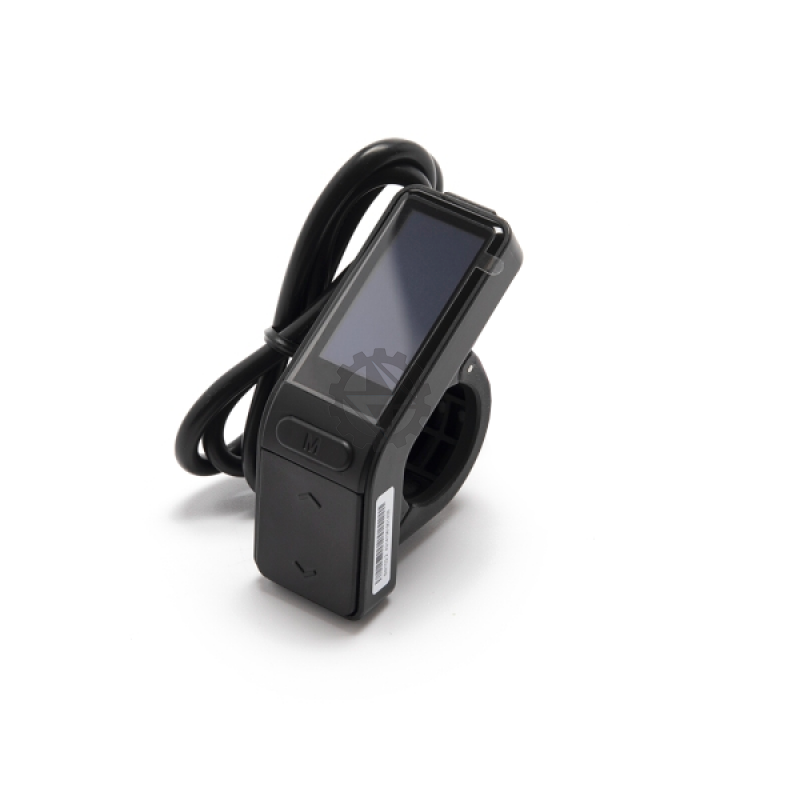
There isn't one Talaria display that fits every bike. We stock four OEM Talaria displays, and each is listed for specific models: the MX3 takes a display with a white connector, the Sting R MX4 and the X3 (also sold as the xXx) share a display with a 9-pin black connector, the MX5 and X3 Pro use a color display, and the MX4 Evo / Expert uses a large LCD with a waterproof plug. Order by model first, then check the plug on your old screen before you buy.
That's the short version. Below is the fitment table, how to figure out which bike you actually have, the swap itself, and what to check if the new screen doesn't come up right.
Talaria display fitment chart (X3, xXx, MX3, MX4, MX5)
| Your bike | Correct display | Connector / screen | Notes |
|---|---|---|---|
| Talaria Sting MX3 (TL3000) | Talaria Sting MX3 replacement display (white connector) | White connector | Listed for the MX3 / TL3000 only. It will not work on other models. |
| Talaria Sting R MX4 | Talaria Sting R MX4 / X3 replacement display (black connector) | 9-pin black connector | Same display as the X3 / xXx. |
| Talaria X3 (xXx) | Same Sting R MX4 / X3 display as above | 9-pin black connector | X3 and xXx are the same bike. Not the same as the X3 Pro. |
| Talaria Sting MX4 Evo / Expert | Talaria MX4 Evo / Expert LCD large display with waterproof plug | Waterproof plug, large LCD | Different part from the standard Sting R MX4 display. |
| Talaria Sting MX5 | Talaria MX5 / X3 Pro color replacement display | Color screen, 9-pin black connector | Shared with the X3 Pro. |
| Talaria X3 Pro | Same MX5 / X3 Pro color display as above | Color screen, 9-pin black connector | Don't confuse it with the plain X3. |
Two things trip people up in that table.
First, the black connector shows up on two different displays. The Sting R MX4 / X3 display and the MX5 / X3 Pro color display are both listed with a 9-pin black connector. So "my plug is black" isn't enough to pick the right one. You need the model too. Of the four, the MX5 / X3 Pro part is the color display. A Sting R MX4 or an X3 / xXx takes the other black-connector part.
Second, "MX4" covers more than one bike. A standard Sting R MX4 and an MX4 Evo or Expert use different displays. The Evo / Expert gets the large LCD with the waterproof plug.
How to tell which Talaria you have
Most wrong-display orders we see come down to the model, not the part. When someone tells us a new display "doesn't work," the first thing we check is whether they ordered the right one for their bike. A few ways to pin it down:
- Look at your purchase paperwork. Your bike invoice, dealer receipt or registration should name the model (MX3, Sting R MX4, MX4 Evo, MX5, X3 / xXx, X3 Pro). This is the quickest and most reliable check.
- Know the alternate names. The X3 and the xXx (often written XXX) are the same bike. The name depends on the country and the dealer. The X3 Pro is a different model with a different display.
- Check the model code. Some paperwork and dealer listings use TL-series codes instead of the model name. Our MX3 display listing, for example, names the MX3 / TL3000. If all you have is a TL code and you're not sure which bike it means, send it to us with a photo of the bike.
- Check the plug color. White means the MX3 display. Black means one of the 9-pin black connector displays, so you still need the model to tell those apart.
- Use the old screen as a cross-check. A large LCD with a waterproof plug points to the MX4 Evo / Expert. If your stock screen matches the MX5 / X3 Pro color display, that points to those two bikes. Treat this as a second check after the model, not the deciding factor.
If the bike came to you used, with a swapped controller or a non-stock dash, don't trust the plug alone. Earlier owners sometimes change parts, and an aftermarket controller can come with its own display. In that case, a photo of the plug and the controller label is the safest way to confirm before you order.
Cracked screen or Talaria display upgrade?
Most people looking for a Talaria screen have a cracked or dead one after a crash or a drop. The parts for that are the OEM displays in the table above, matched to your model.
If you're asking whether you can upgrade an MX4 or an X3 / xXx to the MX5 color display, our listings don't support that. The color display is listed for the MX5 and X3 Pro only, and the MX4 and X3 have their own display. Even though the plug may look the same, the display talks to the bike's controller and battery system, so we stick to the model-specific part. If you want a different dash setup, talk to us before buying anything.
Cracked screens tend to happen again. The aluminum display protector for Talaria MX3 / MX4 is made from 6061-T6 anodized aluminum and is listed for stock MX3 and MX4 bikes (it also fits EggRider displays and the EBMX X-9000 controller display). Its listing doesn't name the X3, MX5, X3 Pro or MX4 Evo / Expert, so don't assume it fits those.
How to replace a Talaria display
The OEM displays are sold as direct replacements for the matching model. The steps below are general, safe steps that apply across the Sting and X3 lineup. Exact bolt sizes and clamp designs vary by model and year, so look at how yours is mounted before you start loosening things.
Before you start: you're working on a high-voltage bike. Don't plug or unplug any connector with the bike powered on.
- Turn the bike off and remove or disconnect the battery. Follow the normal procedure for your model. Don't skip this step to save two minutes.
- Take photos. Shoot the display, its mount and how the cable is routed and zip-tied before you touch anything. That saves guessing later.
- Trace the display cable to its connector. Follow it from the back of the display to the plug. Cut any zip ties carefully so you don't nick the wire.
- Unplug the old display. Most of these plugs have a locking tab. Press the tab and pull on the connector body, not the wires. If it won't budge, look for the latch rather than forcing it.
- Remove the display from its mount. Undo the clamp or bracket bolts and slide the old display off.
- Compare old and new. Before you go further, set them side by side. The plug color, pin count and shape should match. If they don't, stop. You probably have the wrong part, and plugging a mismatched connector in can cause damage.
- Inspect the pins. Check both halves of the connector for bent, pushed-back or corroded pins, and for water or dirt inside. Clean it out if needed.
- Mount the new display. Fit it to the bracket and snug the bolts. Don't overtighten into plastic.
- Plug it in. Push the connector together until the lock clicks. Route the cable the same way it was, away from the steering stops so it can't get pinched when you turn the bars, and zip-tie it back in place.
- Reconnect the battery and power on. Check that the screen boots and shows battery level. Then, with the rear wheel off the ground, test the throttle gently and confirm the speed reading and mode switching work before you ride.
New Talaria display not working? What to check
If the display powers up but something's off, work through these in order before assuming the new part is bad.
- Confirm it's the right display for your model. Go back to the fitment chart. This is the most common cause by far.
- Reseat the connector. Unplug it with the power off, check the pins again, and push it in until it locks.
- If the screen shows WAIT and no speed, or you can't switch modes: these are the checks we've used after an X3 display swap. With the power off, unplug both brake sensor connectors, then the throttle connector, and look for bent or pushed-back pins. Plug everything back in firmly, power on, and try again.
- Note any error code. If the display shows an error, write it down exactly.
- Think back to the old display. Did speed and modes work on the old one right before it broke? If they didn't, the problem may not be the display at all.
If you've done all that and it still isn't right, send us your order number, a photo of the connector pins on both sides and a short video of the display powering up. That's usually enough for us to tell whether it's a wiring issue, a wrong part or a faulty unit.
Riding a Sur-Ron instead?
None of the Talaria displays above are listed for Sur-Ron bikes. We carry the OEM Sur-Ron replacement display separately. If you're still deciding between Sur-Ron models, our Light Bee X vs Ultra Bee comparison covers the differences. For everything else on the Talaria side, from throttles to swingarms, see our Surron and Talaria parts collection. If you're upgrading brakes while you're at it, our Ultra Bee brakes and foot brake guide covers what fits the Talaria X3, MX3 and MX4.
FAQ
Is the Talaria MX4 display the same as the MX5 display?
No. The standard Sting R MX4 uses the black-connector display shared with the X3 (xXx). The MX5 uses the color display shared with the X3 Pro. Both are listed with a 9-pin black connector, so check your model, not just the plug.
Does the Talaria MX3 display fit the MX4?
No. The MX3 display has a white connector and is listed for the MX3 (TL3000) only. It won't work on other models.
Is the Talaria X3 display the same as the xXx display?
Yes. The X3 and xXx are the same bike under different names, and both take the Sting R MX4 / X3 black-connector display.
Will the X3 display fit an X3 Pro?
No. The X3 uses the same display as the Sting R MX4. The X3 Pro uses the color display shared with the MX5.
Which display does the MX4 Evo or MX4 Expert use?
The LCD large display with the waterproof plug. It's a different part from the standard Sting R MX4 display.
Do I need to program or pair a new Talaria display?
Our display listings don't mention a pairing or coding step, and they're sold as direct replacements for the matching model. We can't promise that for every bike, though, especially one with a non-stock controller. If the new display doesn't work right after plugging in, check that you have the right part for your model, go through the connector checks above, and then contact us.
If you're not sure which one you have, send us a photo of the plug and the bike, and we'll tell you which display fits.
Share:
2026 Surron Light Bee X vs Ultra Bee: Which Should You Buy?
Ultra Bee Brakes and Surron Foot Brake Kits: Moto Brake Upgrades and OEM Parts for the Light Bee X, Ultra Bee and Talaria